JavaScript Array Methods Every Beginner Should Know
When working with JavaScript, array is one of the most important data structure, and while working with array we use loops most of the time. Instead of writing long loops every time, JavaScript gives us powerful built-in array methods.
In this article, we will understand:
push() and pop()
shift() and unshift()
map()
filter()
reduce()
forEach()
With beginner-friendly examples.
Try them directly in your browser console.
push() – Add element at the end
push() method adds one or more element at the end of the array and returns the new length of the array.
Parameters: element1, element2,....,elementN
Return value: new length of the updated array
Note: push() modifies the original array.
let numbers = [1, 2, 3];

let newLength = numbers.push(4, 5, 6);

console.log(numbers);
console.log("New length: " + newLength); // 6
Before:
[1, 2, 3]
After:
[1, 2, 3, 4, 5, 6]
pop() – Remove element from the end
pop() method removes last element of an array and return that element.
Parameters: None
Return value: Removed element from the array. If array is empty returns undefined.
Note: pop() modifies the original array. So it is a mutating method
let numbers = [1, 2, 3];

let removedElement =  numbers.pop();

console.log(numbers);
console.log(removedElement);// 3
Before:
[1, 2, 3]
After:
[1, 2]
shift() and unshift()
These methods work at the beginning of the array.
shift() – Remove first element
shift() method removes the first element of an array and returns the removed element.
Parameters: None.
Return value: Removed element from the array. If array is empty returns undefined.
Note: shift() modifies the original array. So it is a mutating method
let fruits = ["Mango", "Orange", "Pineapple"];
let removedFruit = fruits.shift();
console.log(fruits);
console.log(removedFruit);//Mango
Before:
['Mango', 'Orange', 'Pineapple']
After:
['Orange', 'Pineapple']
unshift() – Add element at the beginning
unshift() method adds one or more element to the beginning of the array and returns the new length of the array.
Parameters: element1, element2,....,elementN
Return value: new length of the updated array
Note: unshift() method modifies the original array.
let fruits = ["Mango", "Orange", "Pineapple"];
let newLength = fruits.unshift("Grape","Lemon");
console.log(fruits);
console.log(newLength); // 5
Before:
['Mango', 'Orange', 'Pineapple']
After:
['Grape', 'Lemon', 'Mango', 'Orange', 'Pineapple']
map()
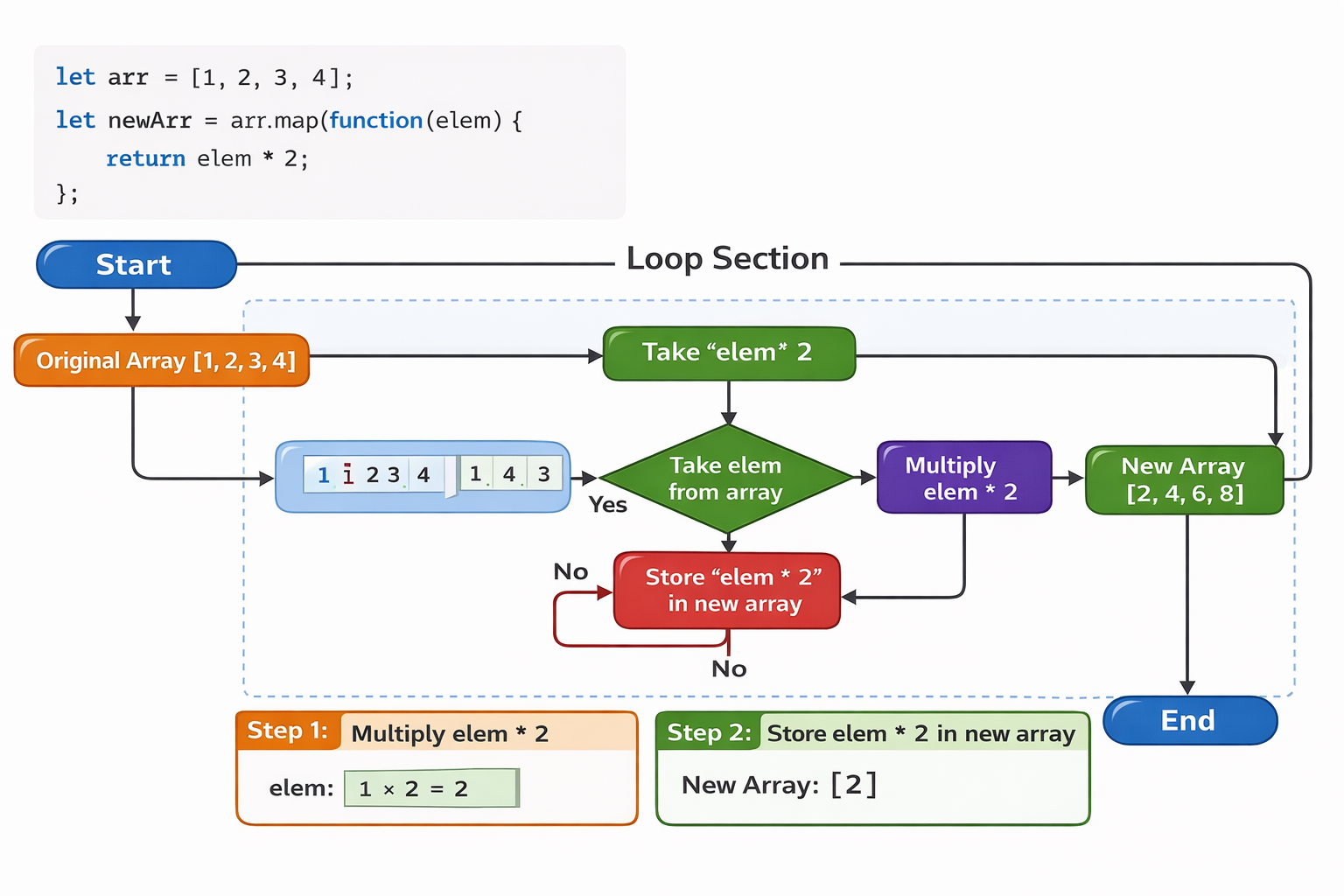
The map() method in JavaScript is a built-in array method that creates a new array by applying a provided callback function to every element of the original array, without modifying the original array.
Parameters
callbackFn
A function that runs for each element of the array.
It receives three arguments:element -> the current element being processed
index -> the position of the current element in the array
array -> the original array on which
map()was called
thisArg (optional)
A value to use asthiswhen executingcallbackFn.
Return value: new array
Example: Double each number
let obj = {
    x : 3,
}

let arr = [1, 2, 3, 4];
let newArr = arr.map(function(elem) {
    return elem * this.x;
}, obj);

console.log(newArr);
Before:
[1, 2, 3, 4]
After:
[3, 6, 9, 12]
filter()
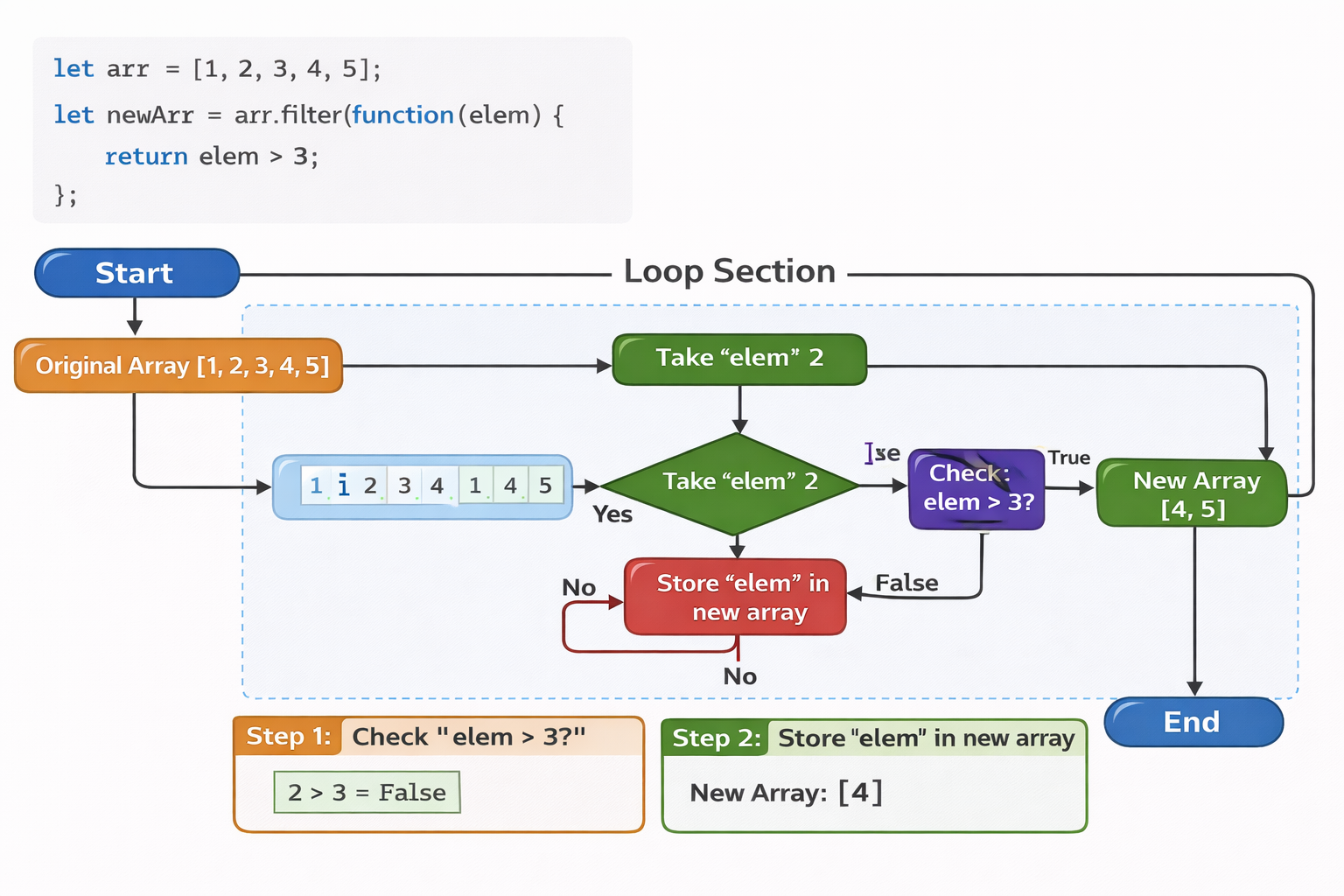
The filter() method in JavaScript is a built-in array method that creates a new array containing only the elements that pass a given condition, without modifying the original array.
Parameters
- callbackFn
A function that runs for each element of the array.
It decides whether the element should stay in the new array or not.
It receives three arguments:
element → the current element being processed
index → the position of the current element in the array
array → the original array on which filter() was called
The function should return:
true → element is included in the new array
false → element is excluded
2. thisArg (optional)
A value to use as this when executing callbackFn.
Return Value
Returns a new array containing only the elements that satisfy the condition provided in the callback function.
If no elements match the condition, an empty array is returned.
Example: Keep numbers greater than a value
let obj = {
    min : 3,
}

let arr = [1, 2, 3, 4, 5];

let newArr = arr.filter(function(elem) {
    return elem > this.min;
}, obj);

console.log(newArr);
Before:
[1, 2, 3, 4, 5]
After:
[4, 5]
Traditional for Loop vs map() / filter()
| Feature | Traditional for Loop |
map() | filter() |
|---|---|---|---|
| Type | Statement | Array instance method | Array instance method |
| Primary Use | General iteration and manual operations | Transform elements into a new array | Select elements based on a condition |
| Parameters | Manually access array[i], i, and array.length |
Callback receives element, index, and array |
Callback receives element, index, and array |
| Return Value | Does not return anything automatically | Returns a new transformed array | Returns a new filtered array |
| Control Flow | Supports break, continue, and return |
Does not support break or continue |
Does not support break or continue |
| Original Array | Can modify the original array | Does not modify the original array | Does not modify the original array |
| Code Style | More verbose and imperative | Shorter and more declarative | Shorter and more declarative |
| Chaining | Cannot be chained easily with array methods | Can be chained (map().filter().reduce()) |
Can be chained (filter().map()) |
Example
Using for loop:
let numbers = [1,2,3];
let result = [];

for (let i = 0; i < numbers.length; i++) {
  result.push(numbers[i] * 2);
}
Using map():
let numbers = [1,2,3];

let result = numbers.map(n => n * 2);
Output:
[2,4,6]
Example
Using for loop:
let numbers = [1,2,3,4];
let result = [];

for (let i = 0; i < numbers.length; i++) {
  if (numbers[i] > 2) {
    result.push(numbers[i]);
  }
}
Using filter():
let numbers = [1,2,3,4];

let result = numbers.filter(n => n > 2);
Output:
[3,4]
Using for loop:
let result = [];

for(let i = 0; i < numbers.length; i++) {
  if(numbers[i] > 10) {
    result.push(numbers[i]);
  }
}
reduce() (Beginner Friendly Explanation)
reduce() is used to combine all values into a single value.
Think of it like:
“Take previous result and current value, and combine them.”
Parameters
callbackFn
A function executed for each element of the array. It receives four arguments:accumulator -> The accumulated result from previous iterations.
currentValue -> The current element being processed.
currentIndex (optional) ->The index of the current element.
array (optional) -> The array
reduce()was called on.
initialValue (optional)
The initial value of the accumulator.
If provided, the accumulator starts with this value.
Return Value
reduce()returns a single value.The value is the final accumulated result returned from the callback function after processing all elements.
Example: Calculate total sum
let numbers = [1, 2, 3, 4];

let total = numbers.reduce(function(accumulator, current) {
  return accumulator + current;
}, 0);

console.log(total);
How it works step-by-step:
| Step | Accumulator | Current | Result |
|---|---|---|---|
| 1 | 0 | 1 | 1 |
| 2 | 1 | 2 | 3 |
| 3 | 3 | 3 | 6 |
| 4 | 6 | 4 | 10 |
Final Result:
10
here 0 is the starting value of accumulator.
forEach()
forEach() runs a function for every element. It does NOT return a new array.
Parameters
callbackFn
A function executed once for each element in the array. It receives three arguments:element → The current element being processed.
index (optional) → The index of the current element.
array (optional) → The array
forEach()was called on.
thisArg (optional)
A value to use asthiswhen executing the callback function.
Return Value
forEach()always returnsundefined.It is used for side effects (like logging, updating variables, or modifying objects).
let numbers = [1, 2, 3];

numbers.forEach(function(num) {
  console.log(num);
});
Output:
1
2
3
Use forEach() when you just want to do something, not create a new array.
Note: forEach() doesn't supports break and continue.
Assignment Idea
1 . Create an array of numbers
Code:
const numbers = [2, 4, 6, 8, 10];
2 . Use map() to double each number
Code:
const doubled = numbers.map(num => num * 2);

console.log(doubled);
//Output: [4, 8, 12, 16, 20]
3 . Use filter() to get numbers less than 10
Code:
const filtered = doubled.filter(num => num < 10);

console.log(filtered);
// Output: [4, 8]
4 . Use reduce() to calculate total sum
Code:
const totalSum = filtered.reduce((accumulator, current) => accumulator + current, 0);

console.log("Total Sum:", totalSum);
//Output: Total Sum: 12
Summary
In this article, we learned several useful JavaScript array methods. We started with push(), pop(), shift(), and unshift() to add or remove elements from arrays. Then we explored map() to transform elements, filter() to select elements based on a condition, forEach() for iteration, and a basic introduction to reduce() to combine values into a single result.
We also compared these methods with the traditional for loop to understand their differences. Practicing these examples in the console will help you understand how these methods work in real code.
Happy Coding 💻